
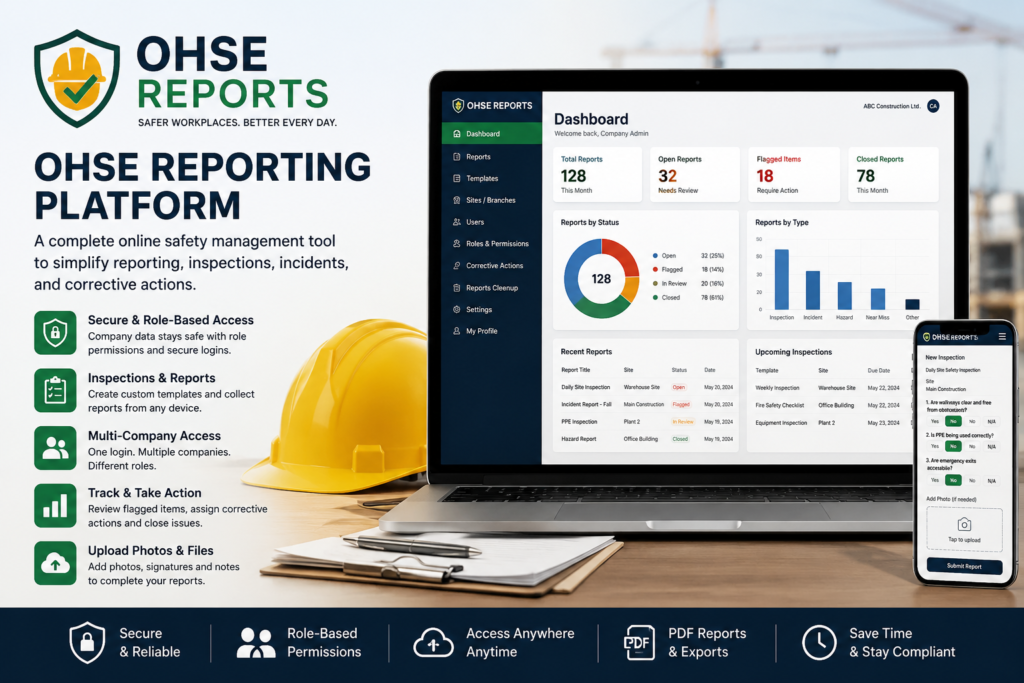
OHSE reporting platform software gives companies a cleaner, faster, and more organized way to manage workplace safety reports, inspections, incidents, corrective actions, users, sites, and role-based workflows in one secure online system.
- Why Companies Need an OHSE Reporting Platform
- How OHSE Reports Works
- OHSE Reporting Platform Roles and Permissions
- Report Flow by Role
- Templates, Inspections, and Safety Reports
- Multi-Company User Access
- Security Features in OHSE Reports
- Report Cleanup and Record Control
- A Practical Online Safety Management Tool
Why Companies Need an OHSE Reporting Platform
Many companies still manage safety reports using paper forms, spreadsheets, emails, and photo attachments. This may work for a small team at the beginning, but it quickly becomes difficult when a company has multiple sites, several supervisors, many workers, and regular inspections. Reports can be delayed, misplaced, duplicated, or missed entirely. When a workplace hazard or incident needs attention, slow reporting can create bigger problems.
An OHSE reporting platform helps companies move safety documentation into one central online dashboard. Workers can submit reports, supervisors can review site-level issues, safety leads can manage flagged items, and company admins can control users, locations, templates, and records. This creates a more reliable safety process and makes daily reporting easier for everyone involved.
Companies can also use external safety resources such as the Canadian Centre for Occupational Health and Safety, OSHA, and ISO 45001 when improving internal health and safety programs.
How OHSE Reports Works
OHSE Reports is built as a company-based online safety system. When a new user signs up, the system creates a demo company and makes the signup person the Company Admin for that demo company. This makes sense because the person testing the system needs enough access to add sites, add users, assign roles, and understand how the full workflow works.
The demo account stays limited, so the company can test the system without having unlimited access. A demo company can have limits for users, sites, reports per month, storage, and demo time. This allows companies to try the platform properly while keeping the system controlled.
If the company wants full setup, more users, more storage, custom templates, or long-term access, they can contact the OHSE Reports team through the contact page. This is a practical model because companies can test the system first and then request a proper setup when they are ready.
OHSE Reporting Platform Roles and Permissions
A strong OHSE reporting platform needs clear user roles. OHSE Reports separates responsibilities so each user can only access the parts of the system they need. This helps protect company data and keeps the safety workflow organized.
The Platform Owner is the main owner of the full OHSE Reports system. This role can manage all companies, demo accounts, plans, limits, platform settings, and support-level controls. The Platform Owner is different from a Company Admin.
The Company Admin is the main administrator for one company. This is usually the person who signs up for the demo. A Company Admin can manage their own company, rename company details, add sites or branches, add users, assign roles, manage templates, review reports, and use report cleanup tools within their own company.
A Company Safety Lead can review reports, monitor flagged issues, manage corrective actions, and help close safety workflows. A Site Supervisor can manage assigned site reports and review site-level safety concerns. A Worker or Inspector can submit reports, upload photos, and complete assigned inspections.
The built-in Role Permissions page helps admins understand what each role can do. This makes it easier to train users and prevents confusion when assigning permissions.
Report Flow by Role
The report flow is one of the most important parts of OHSE Reports. Reports do not just get submitted and forgotten. They travel through the right role path based on the company structure.
A typical report route starts with a Worker or Inspector submitting a report. The Site Supervisor reviews site-level issues. The Company Safety Lead reviews safety or compliance concerns. The Company Admin has final company-level control. After review, the report can be closed, exported, archived, or cleaned up based on permission.
If a report has a failed safety item, the system can mark it as flagged. For example, if an emergency exit is blocked, PPE is missing, equipment is unsafe, or an incident is reported, the correct roles can be notified and the issue can move into review. Supervisors or safety leads can add corrective action notes, update the report status, and close the item after it is resolved.
This kind of structured route helps companies improve accountability. Everyone knows where the report goes, who should review it, and what action is required.
Templates, Inspections, and Safety Reports
OHSE Reports supports safety templates for different workplace needs. A company can start with basic templates or create its own custom report forms. Common examples include Daily Site Safety Inspection, Hazard or Near Miss Report, Incident Report, PPE Inspection, Equipment Inspection, Fire Safety Checklist, Vehicle Inspection, and Housekeeping Inspection.
Each template can include different question types, such as yes/no answers, text fields, number fields, dropdowns, checkboxes, photos, signatures, dates, times, and notes. Important questions can be marked as required. Some failed answers can require a photo or explanation before submission.
This makes the OHSE reporting platform useful for many industries, including construction, restaurants, property management, manufacturing, maintenance, healthcare support services, cleaning teams, and field operations.
Multi-Company User Access
In real business situations, the same person may work with more than one company. OHSE Reports supports this through multi-company user access. One login account can belong to multiple companies, and each company membership can have a different role.
For example, the same user can be a Worker in one company, a Site Supervisor in another company, and a Company Admin in a demo company. When the user logs in, they can switch company workspaces. Reports, users, sites, templates, and permissions remain separated by company.
This structure is important for privacy and security. Company A should never see Company B’s reports, even if the same person has access to both companies. Every report stays attached to the correct company and workspace.
Security Features in OHSE Reports
Security is a major part of any online safety reporting tool. OHSE Reports includes company separation, role-based permissions, secure password reset, email verification, demo limits, rate limiting, audit logging, and protected upload handling.
Public signup creates a demo company, but users do not become Platform Owners. The signup person becomes Company Admin only for their own demo company. They cannot access other companies, change platform settings, or upgrade their own plan.
The platform also includes HTTPS enforcement, security headers, blocked public access to sensitive files, upload folder protection, password hashing, secure reset tokens, and login protection. These features give the system a strong foundation for controlled public demo use and early customer onboarding.
Companies can also review privacy resources from the Office of the Privacy Commissioner of Canada when planning how to handle workplace records and employee information.
Visitors can read the platform’s privacy policy and terms and conditions before using the service.
Report Cleanup and Record Control
Not every report needs to stay active forever. OHSE Reports includes cleanup tools so authorized users can manage old, duplicate, draft, or unnecessary records. This helps companies keep their dashboard organized and control storage usage.
Cleanup access depends on the user’s role. Workers cannot delete reports. Site Supervisors can clean up assigned site reports with limited permission. Company Admins can manage company-level cleanup. The Platform Owner can support higher-level cleanup and hard delete options when required.
This permission-based approach protects important safety records while still giving companies the ability to manage old reports responsibly.
A Practical Online Safety Management Tool
OHSE Reports is designed to be practical, not complicated. A company can sign up, start a demo, add sites, add users, assign roles, submit safety reports, review flagged issues, and understand the report workflow before requesting a full setup.
The system is useful for companies that need better organization, stronger accountability, and easier access to safety documentation. With company workspaces, role-based routing, multi-company users, secure login tools, report cleanup, and PDF-style records, OHSE Reports gives businesses a strong safety reporting foundation.
To test the system, companies can visit the signup page and create a demo account. For custom setup, additional storage, more users, more sites, or custom templates, companies can contact the OHSE Reports team through the contact page.
For businesses that want a simple, secure, and organized way to manage workplace safety records online, OHSE Reports is a practical OHSE reporting platform.
No comments yet